


|
|
|
|
Tutorial led by Editor Michel Romaggi in collaboration with the author Tatsuya Moments
Edited and published by Yvette Depaepe, the 9th of December 2025
This photo was taken on a rainy evening in the city.
I was out walking with no particular destination in mind, simply enjoying the way the rain was softening the lights and reflections around me.
Then, when I noticed this woman standing quietly under her umbrella, illuminated by the blurred lights of passing cars and neon signs, I experienced a moment of stillness amidst the city's bustling rhythm.d this woman standing quietly under her umbrella, illuminated by blurred car lights and neon signs, I felt a moment of stillness in the middle of the city's rhythm.
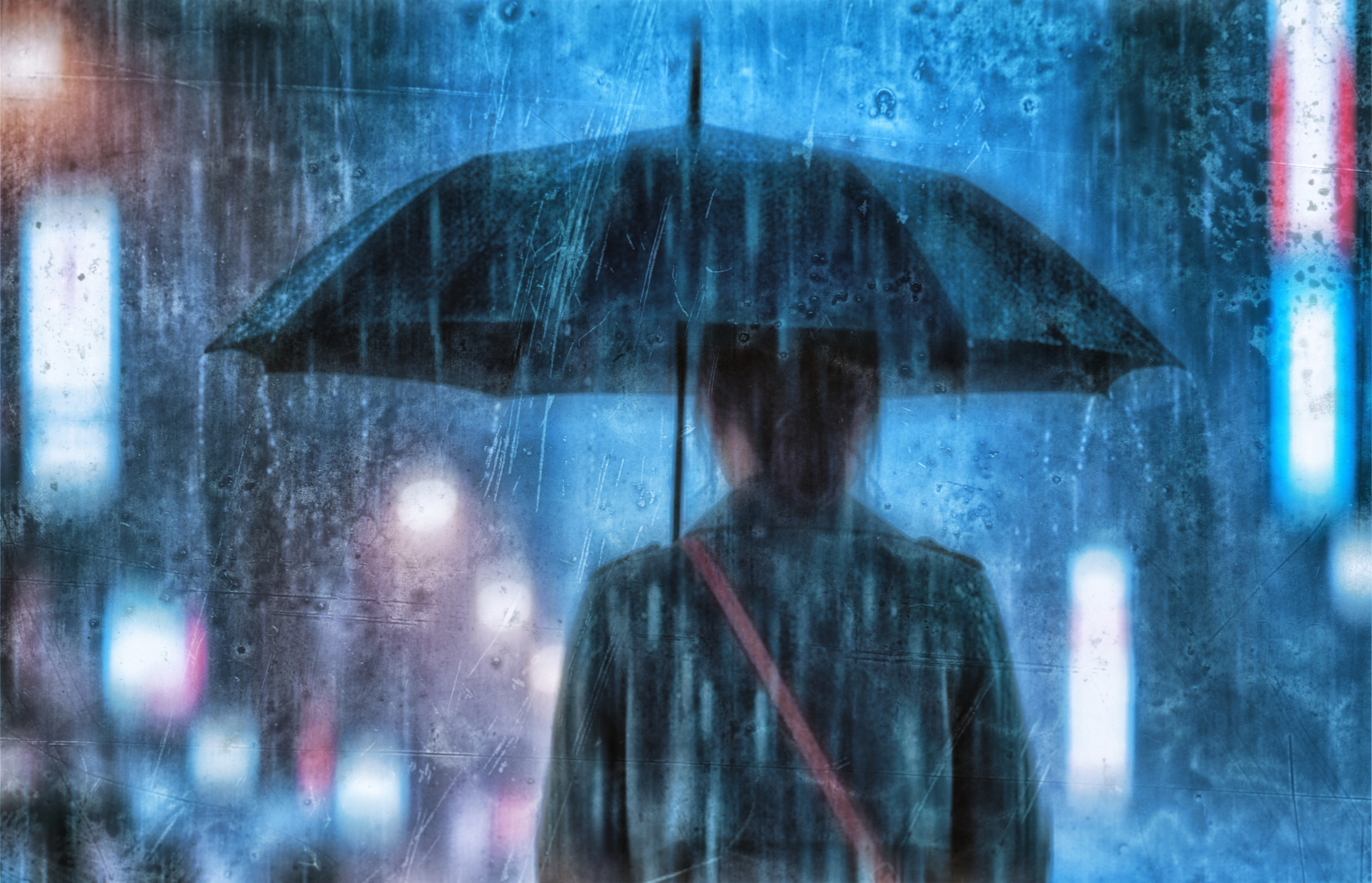
‘Blue Silence’
My intention was not to document the person, but the atmosphere.
I wanted to capture the solitude and quiet strength, and the feeling of looking at the world through a thin veil of rain.
Equipment
• Camera: RICOH GR III
• Lens: Built-in 28mm equivalent
• Filters: None
• Tripod: Not used (handheld)
I started with a basic 'straight out of camera' file. It was during post-processing that the transformation occurred.
POST-PROCESSING (with Layer Breakdown)
My Editing Approach
The editing process is largely intuitive, driven by emotion rather than strict rules.
As I edit, I ask the image what it needs:
Softer highlights, deeper blues or more ambiguous textures, for example.
The final work becomes more than just a photograph of the moment;
but an interpretation of how that moment felt: silent, melancholic and dreamlike. The structure of the layers used in Photoshop is shown below, from bottom to top, and represents the actual workflow.
Post-Processing Workflow (with Visual Step-by-Step Screenshots)
Below is an overview of my editing process from step ① to ⑥, illustrated with actual screenshots from Photoshop.
These images show how each layer and effect transformed the photo as I built the final mood intuitively.
① Original Image — Base Composition
No major adjustments yet. Base composition only.
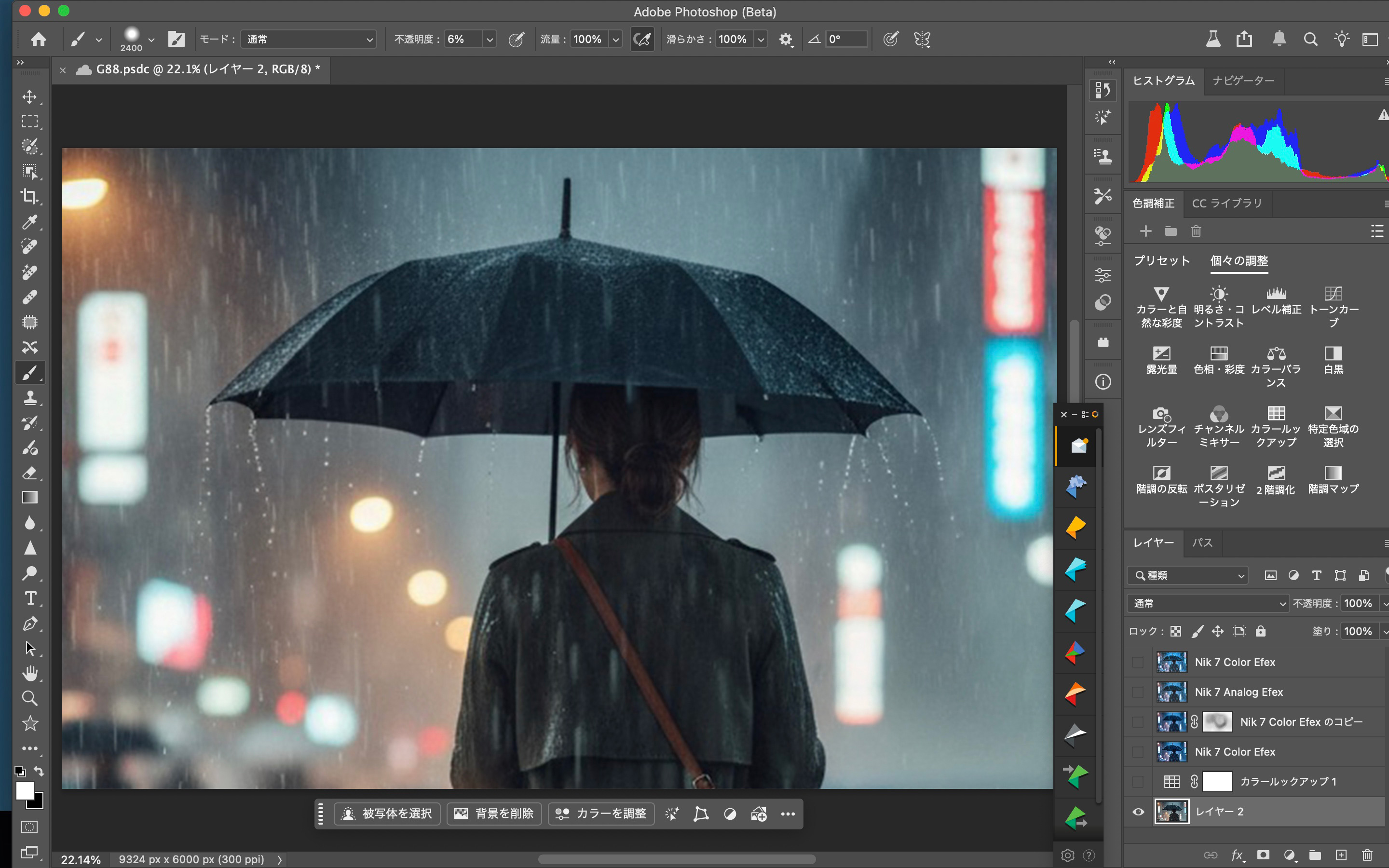
② Basic Color Setup — Photoshop + Color Look Up
At this stage, I applied a Color Look Up table to define the overall direction of the tones.
This creates the foundation of the cold, rainy atmosphere.
Brightness, contrast, and color balance were also lightly adjusted.
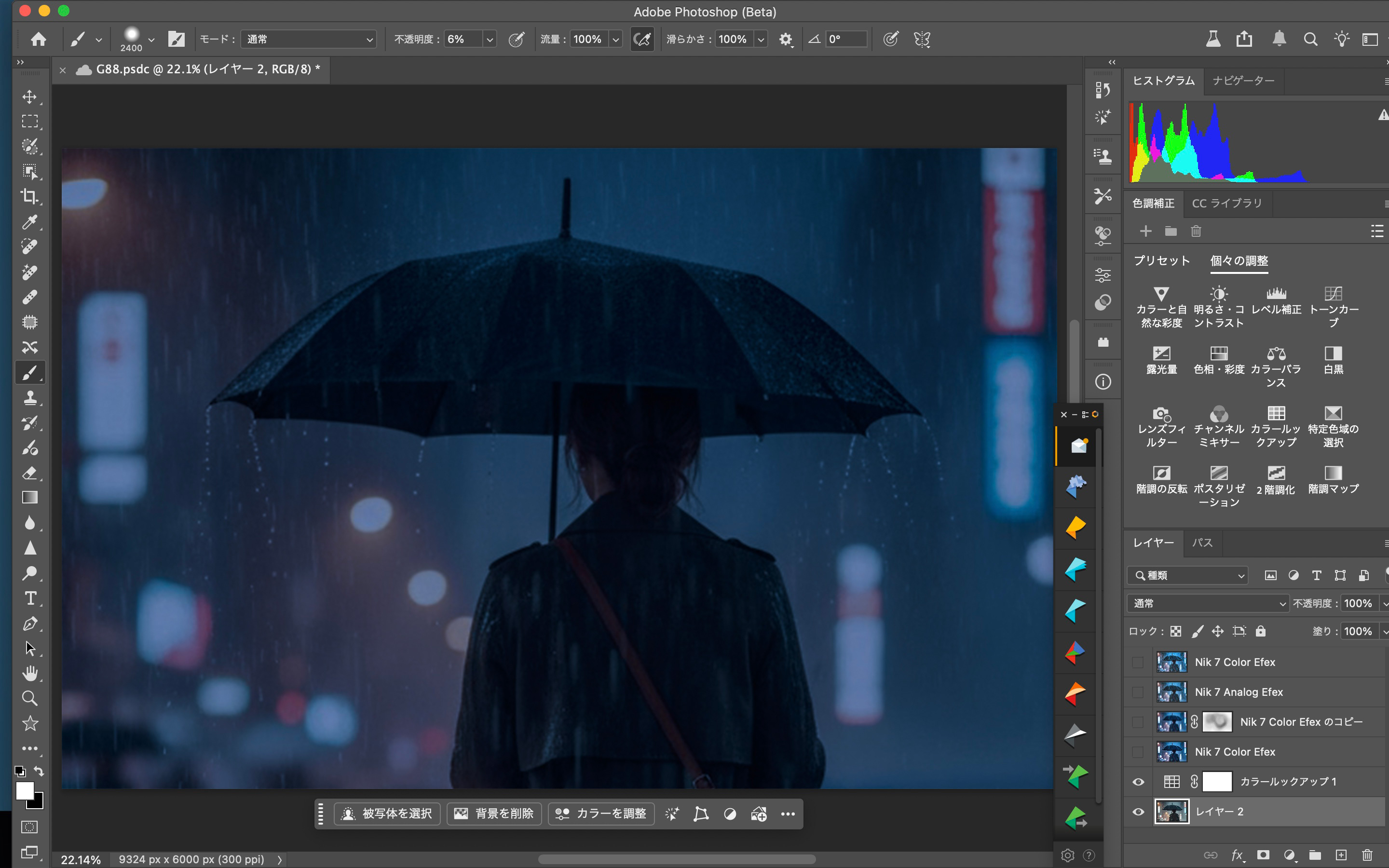
③ Nik 7 Color Efex — Establishing the Blue Mood
Using Nik Color Efex, I shaped the essential mood:
• softened highlights
• deepened the blues
• adjusted luminance and contrast
• clarified midtones
This step builds the emotional color base of the final image.
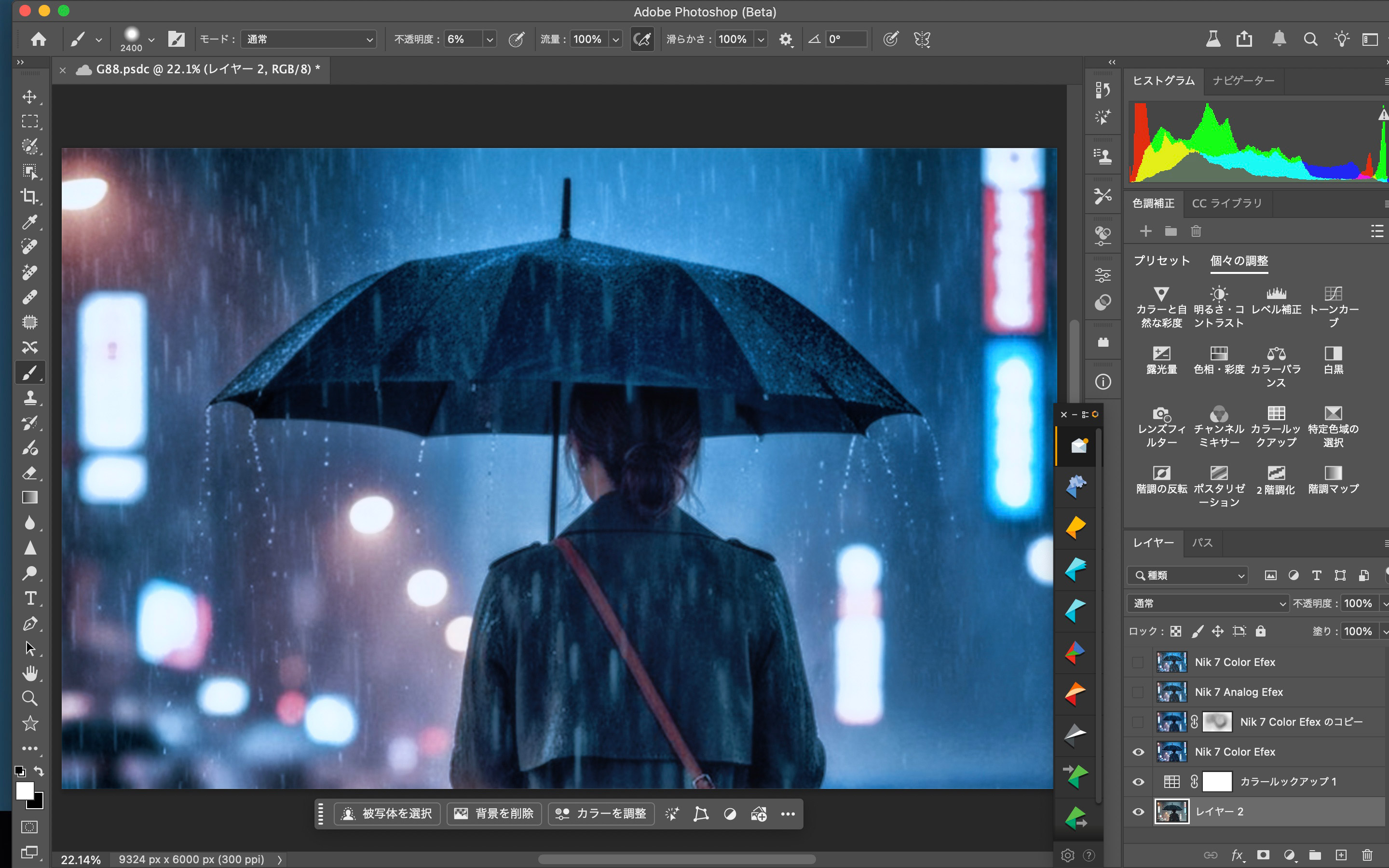
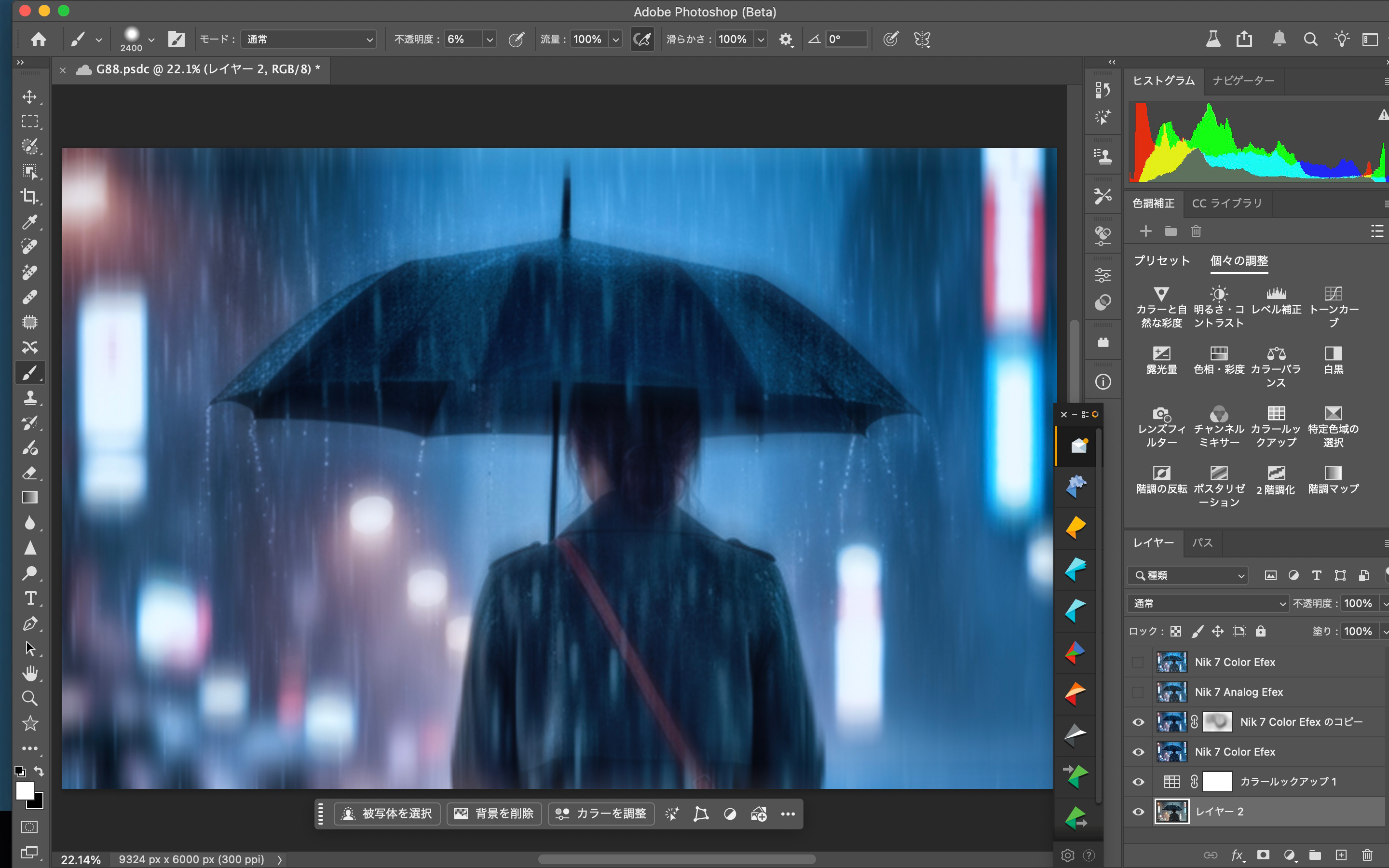
④ Duplicate Color Efex Layer — Motion Blur (~370)
I duplicated the previous Color Efex layer and added Motion Blur (approximately 370).
This enhances:
• the softness of background lights
• the smooth trails of rain
• the dreamy separation between subject and environment
A mask was used to control where the blur appears.
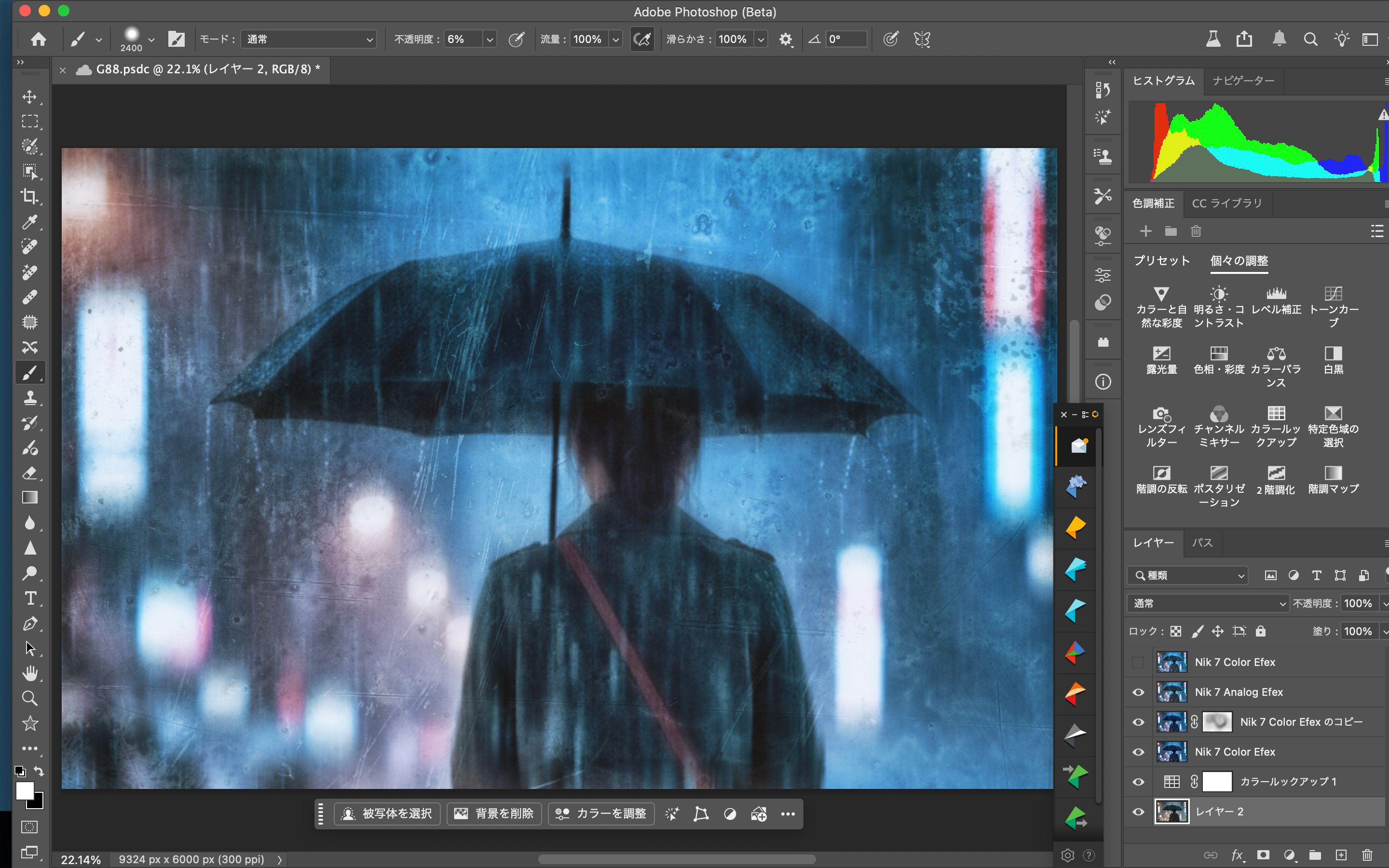
⑤ Nik 7 Analog Efex — Adding Textures & Imperfections
With Analog Efex, I added subtle layers of:
• scratches
• stains
• atmospheric haze
• film-like imperfections
These textures make the image feel like a memory seen through a wet, imperfect surface.
⑥ Final Adjustments — Nik Color Efex (Second Pass)
For the final polish, I returned again to Nik Color Efex, refining:
• saturation
• final blue tones
• contrast
• depth in shadows
This step brings cohesion and emotional depth to the whole image.
BIOGRAPHY
My name is Tatsuya, and I am a street and fine-art photographer based in Japan.
Photography began as a simple way to record daily life, but over time it became a language for expressing emotions that are difficult to put into words.
I am often drawn to themes such as rain, silence, and solitary figures—moments that hold a quiet story within them.
For me, a photograph is a small visual poem.
 | Write |
 | joanaduenas PRO Impressive work, thanks for sharing your workflow. |
 | Chilsong Pak PRO Thank you for sharing. |
 | Antonyus Bunjamin (Abe) PRO Thank you for sharing Tatsuya..for detail process in photoshop!! |
 | Leechee Z PRO Excellent !!!Thanks for sharing, Tatsuya. Thanks to 1X too. |
 | Douglas Neese Thanks to Tatsuya, and to 1X.
|
| | Douglas Neese |
 | Tracy Lee PRO Excellent work. Thanks for sharing the detail process. |
 | Cicek Kiral CREW Thanks a lot for your efforts. I like this a lot... |
 | Lynn Adams PRO Such a transformation, wow! Many kind thanks for sharing your insight and inspiration dear. A well deserved highlight! A lovely week ahead. |
 | Eiji Yamamoto PRO Thank you so much for sharing such an inspiring article! Congratulations! |
 | Miron Karlinsky Thank you
|
 | UstinaGreen PRO Wonderful work with blue rein!
Fantastic light and tonality!
Many thanks for your presented! |
 | Patrick Compagnucci PRO Excellent work, thanks for sharing! |
 | Montserrat Alviani PRO Excellent article! Thank you so much for sharing the image process in such detail. I think you successfully conveyed that immersive and mysterious atmosphere you envisioned from the beginning. Congratulations! |